

Vendor offboarding is the coordinated process of removing a third party’s access, credentials, data, devices, integrations, and operational dependencies when a contract, project, individual assignment, or approved access window ends.
A secure process must cover both human and machine identities across IT, cloud, OT, and industrial environments—not just disable one user account.
This vendor offboarding checklist gives security, IT, procurement, legal, and operations teams a repeatable way to revoke access, preserve evidence, and verify that no usable pathway remains.
Key Takeaways
- Start offboarding from a defined trigger and assign one accountable owner.
- Revoke human access, machine credentials, active sessions, remote pathways, and physical access.
- Treat timing as risk-based. High-risk access may require immediate action, while planned contract completion can follow an approved change window.
- Use a separate runbook for OT and isolated environments where safety, availability, and local credentials matter.
- Preserve an audit-ready evidence package showing what was revoked, when, by whom, and how completion was verified.
- Continue monitoring after closure for failed logins, stale tokens, unexpected traffic, and reactivated accounts.
What Is Vendor Offboarding?
Vendor offboarding is the formal closure of a third-party relationship from an access and security perspective.
It applies when a supplier contract ends, a project closes, an individual leaves the vendor, a role changes, a maintenance window expires, or the organization suspends access because of risk.
Offboarding is broader than deactivating a directory account. A complete process also addresses:
- Privileged accounts
- API keys and service accounts
- Certificates and SSH keys
- VPN and zero trust access
- Jump hosts and maintenance tunnels
- Cloud roles and SaaS applications
- Collaboration platforms
- Physical badges and issued devices
- Retained organizational data
- Contractual obligations
- Access to OT and industrial systems
The goal is simple: after the approved endpoint, the vendor should have no unauthorized way to reach systems, data, facilities, or operational assets.
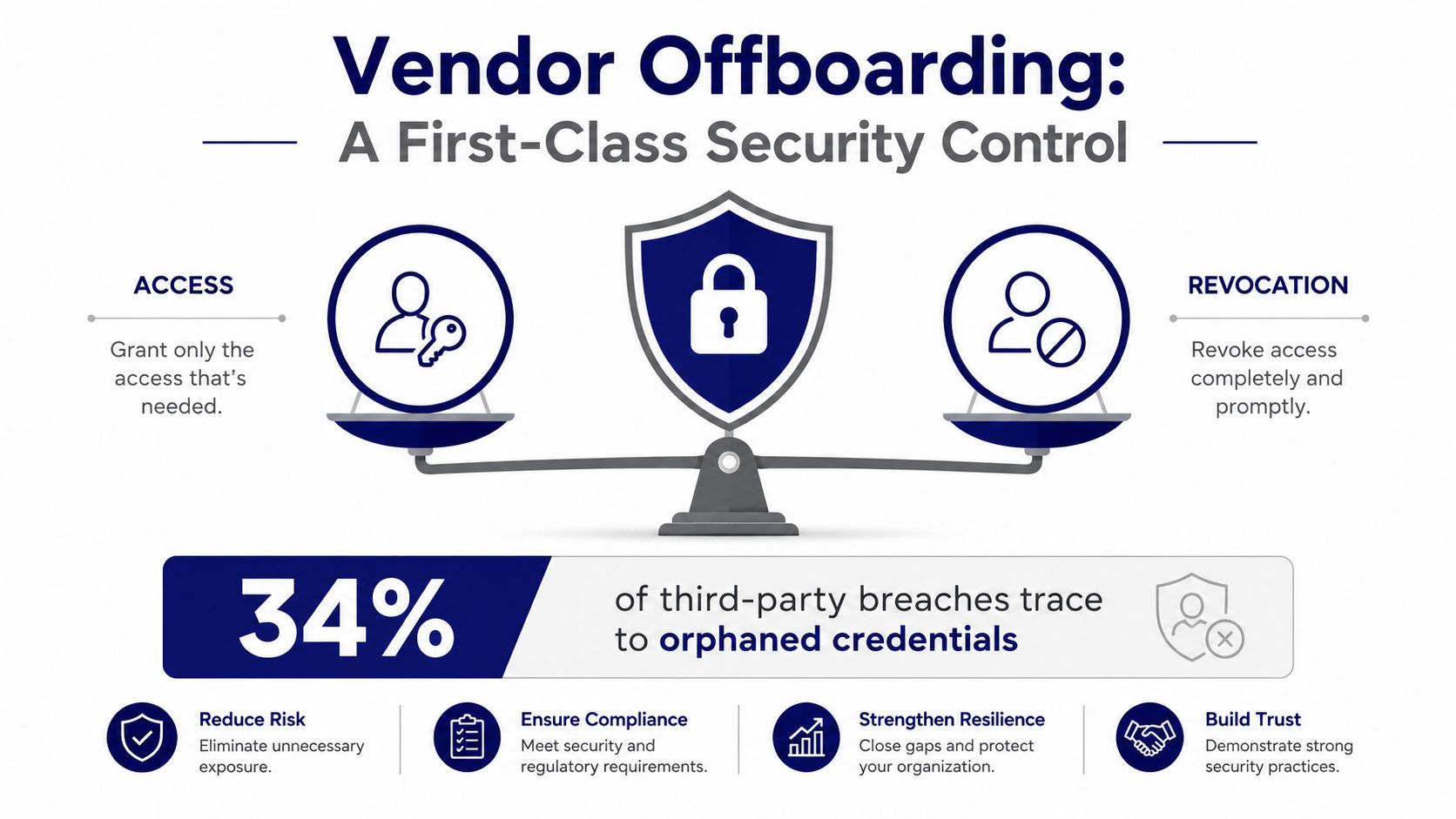
Vendor Offboarding Checklist
- Confirm the trigger and effective time. Record why access is ending, the exact cutoff time, the systems in scope, and whether the case is planned, urgent, or for cause.
- Assign ownership and approvals. Name one accountable coordinator and identify the required owners from security, IT, procurement, legal, data governance, and OT or plant operations.
- Build the access inventory. Reconcile approved access records with identity, privileged access, remote access, cloud, application, network, endpoint, badge, and OT records.
- Revoke human and machine access. Disable accounts, terminate sessions, remove group and role memberships, revoke tokens and certificates, and rotate shared or embedded credentials.
- Close remote and operational pathways. Remove VPN, ZTNA, PAM, jump-host, maintenance-tunnel, firewall, allowlist, and physical-access permissions.
- Recover assets and handle data. Retrieve devices, badges, keys, documentation, and media. Confirm the required return, transfer, retention, or deletion of organizational data.
- Preserve evidence. Capture approvals, timestamps, change records, access reports, relevant logs, asset receipts, data-handling confirmations, and unresolved exceptions.
- Validate and monitor. Test that access no longer works, search for orphaned identities and credentials, monitor for unexpected activity, and obtain final sign-off from the designated owner.
1. Define Triggers and Ownership Before Access Ends
The strongest vendor offboarding process begins before a contract ends.
Contracts, statements of work, access approvals, and maintenance schedules should define who sends the trigger, how quickly teams must act, what evidence is required, and who can approve an exception.
Use a central case or ticket as the system of record. It should link the business relationship to vendor personnel, approved roles, systems, credentials, devices, data, and operational dependencies.
| Trigger | Source System | Accountable Role |
|---|---|---|
| Contract or statement of work ends | Contract lifecycle management | Procurement or vendor owner |
| Project or maintenance window closes | Project or maintenance system | Project manager or maintenance owner |
| Vendor employee leaves or changes role | Vendor notification and identity governance | Vendor manager and identity owner |
| Access approval expires | Identity governance or access request system | Application or system owner |
| Privileged session window expires | Privileged access platform | Privileged access owner |
| Security incident or elevated risk | SIEM, incident response, or risk system | Incident commander or security owner |
| OT work order is completed | CMMS or OT change management | Plant or operations owner |
| Physical access is no longer required | Physical access control system | Facilities or site security |
| Data-processing purpose ends | Data inventory or privacy system | Data owner or privacy lead |
Urgent cases may require disabling access before notifying the vendor. Planned cases may require coordination with production changes, data handover, or safety procedures.
The playbook should support both scenarios without weakening approval and evidence requirements.
2. Set a Risk-Based Revocation Timeline
No universal 24-hour rule applies to every vendor and every system.
Set service-level targets based on:
- Privilege level
- System criticality
- Data sensitivity
- External exposure
- Reason for termination
- Safety impact
- Contractual requirements
- Regulatory obligations
For a high-risk or for-cause termination, organizations may need to disable access immediately and in a coordinated sequence.
For a planned contract end, teams can prepare the inventory and approvals in advance, then execute the revocation process at the agreed cutoff time.
The following timeline is a suggested operating model—not a requirement established by NIST, ISO, or another standard.
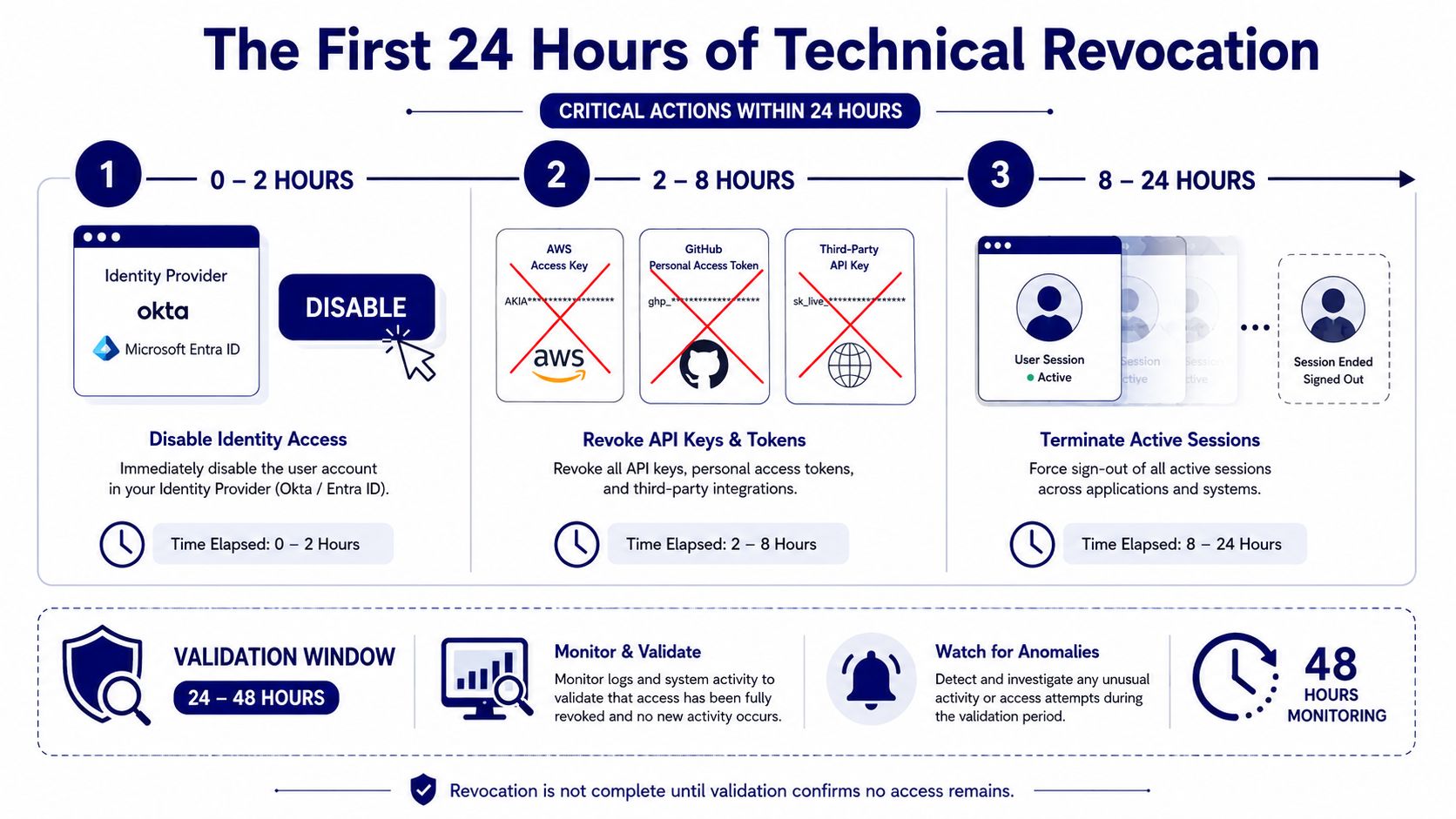
Suggested first-24-hours sequence. Adapt each target to organizational risk, safety, change-control, and contractual requirements.
Suggested Sequence
- 0–2 hours: Disable identity-provider accounts and remote-access entitlements. Block emergency, temporary, and privileged pathways and notify control owners.
- 2–8 hours: Revoke API keys, OAuth grants, access tokens, certificates, SSH keys, and application credentials. Rotate secrets that may be shared or embedded.
- 8–24 hours: Terminate active sessions, close maintenance tunnels, remove network allowlists and firewall exceptions, and invalidate cached access where supported.
- 24–48 hours: Reconcile source systems, test that access fails, review logs for residual activity, document exceptions, and obtain the designated owner’s sign-off.
3. Build a Complete Access Inventory
Do not rely on a single identity directory.
Vendors often accumulate access through multiple systems and machine identities that aren't cleanly linked to a person.
Reconcile at least the following sources:
- Identity provider, directory, SSO, MFA, and identity governance records
- Privileged access, remote access, VPN, ZTNA, jump-host, and bastion records
- Cloud accounts, roles, subscriptions, tenants, and SaaS applications
- Local accounts on servers, appliances, databases, network devices, and security tools
- API keys, service accounts, workload identities, certificates, SSH keys, tokens, and secrets
- Source-code, CI/CD, ticketing, file-sharing, messaging, and collaboration platforms
- OT engineering workstations, HMIs, historians, maintenance systems, gateways, and vendor-managed appliances
- Physical badges, keys, hardware tokens, laptops, removable media, and other issued assets
Compare the approved inventory with what is actually active.
Differences are findings to resolve, not reasons to stop the process. If you can't map an account or credential immediately, restrict or suspend it safely while you confirm ownership.
4. Revoke Human and Machine Access
Disable human access at the control point that prevents downstream authentication, then remove it from local systems and groups as needed.
Terminate active sessions so a previously issued session remains unusable after the account is disabled.
Human Access Checklist
For each person, verify that:
- Disable or remove primary and alternate accounts.
- Remove privileged roles, group memberships, and delegated permissions.
- Revoke MFA devices, recovery methods, certificates, and hardware tokens.
- Terminate active sessions, refresh tokens, and persistent application sessions.
- Shared mailboxes, repositories, workspaces, and collaboration channels are no longer accessible.
- Close or recover physical badges, building access, remote-support tools, and issued devices.
Machine Identity Checklist
Machine access requires a separate sweep.
Service accounts, API keys, certificates, and embedded secrets may keep working even after you disable every named user.
For each machine identity, verify that:
- The business and technical owner is known.
- The credential is revoked, deleted, or transferred to an approved internal owner.
- Rotate shared credentials and secrets known to the vendor.
- Test dependencies so rotation does not interrupt critical services.
- Automation, scheduled jobs, integrations, and vendor-managed agents no longer use the old credential.
- Replacement credentials use least privilege and an approved storage and rotation method.
Safous discusses the importance of governing both identity types in Why Identity Governance Needs to Include Human and Machine Users.
5. Close IT, Cloud, and Network Pathways
Disabling an identity does not always close every route.
Remove the access mechanisms that allowed the vendor to reach the environment and confirm that no unmanaged fallback remains.
Check:
- VPN profiles
- ZTNA policies
- Privileged remote access entitlements
- Jump-host and bastion permissions
- Firewall rules
- IP allowlists
- DNS entries
- Remote-support agents
- Cloud federation
- Cross-account trust
- Application-specific accounts
- Vendor-managed gateways
Terminate active connections and validate the result from both the identity plane and the network plane.
If the vendor used a shared account or a credential embedded in an appliance, rotate it and update the approved internal owner.
6. Use a Separate Runbook for OT and Isolated Environments
Vendor access to OT, industrial control systems, and isolated or intermittently connected environments requires coordination with plant operations and safety teams.
Directly disabling an account or rotating a credential can interrupt maintenance, monitoring, or production if you don't understand the dependencies.
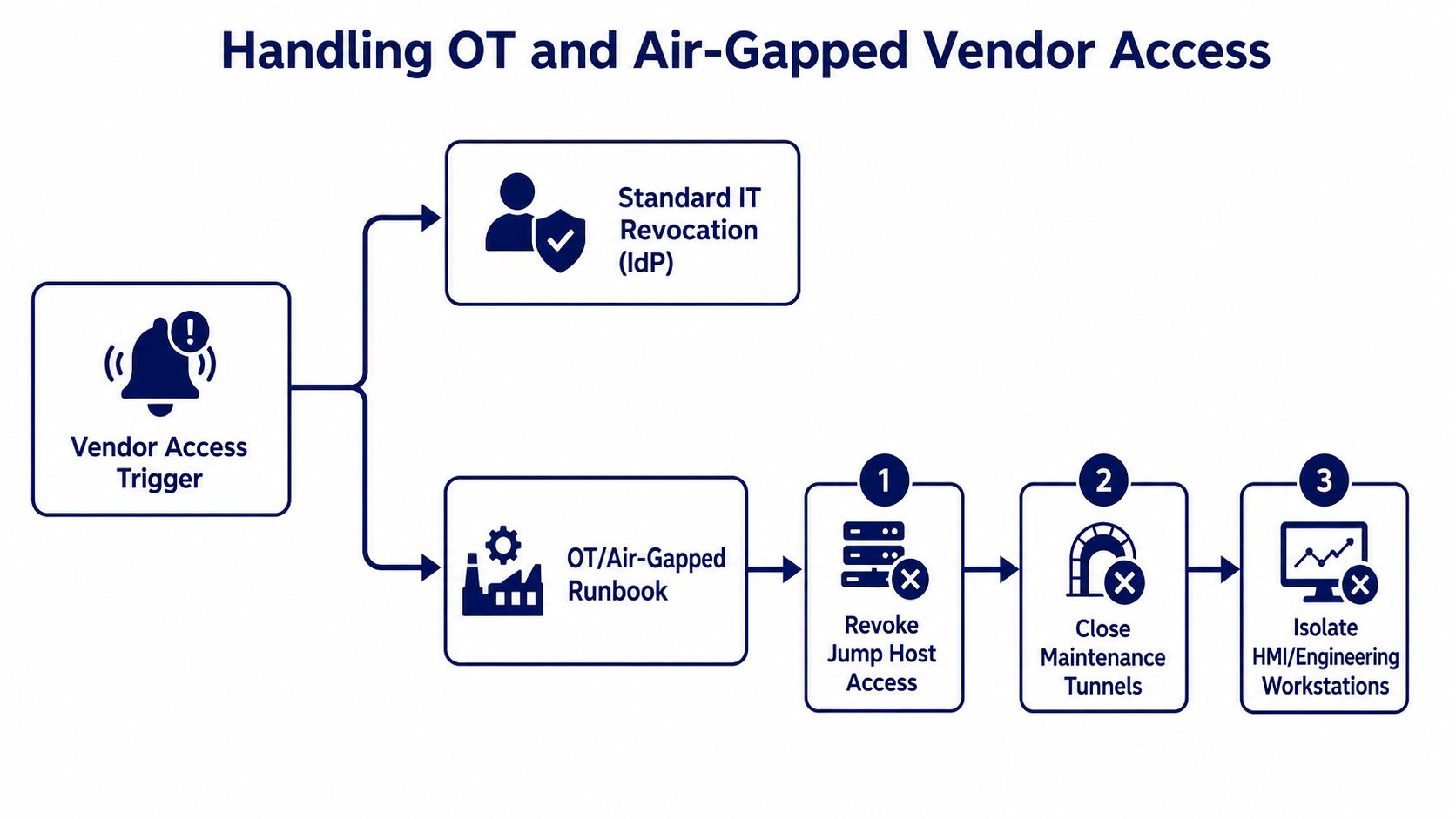
Use an OT-specific branch when access depends on jump hosts, maintenance tunnels, local credentials, engineering workstations, or approved change windows.
The OT runbook should include:
- Plant, safety, and system-owner approval for changes that can affect availability
- Removal of jump-host, bastion, remote-support, and maintenance-tunnel access
- Rotation of local, shared, cached, or device-level credentials using approved procedures
- Review of vendor accounts on HMIs, engineering workstations, historians, gateways, and appliances
- Closure of temporary firewall rules, dial-up or cellular pathways, and vendor allowlists
- Secure transfer of configuration files, source files, backups, licenses, and maintenance documentation
- Validation during an approved window, with a rollback plan for safety-critical changes
For a deeper treatment of third-party access in industrial environments, see Securing Third-Party Vendor Access in OT Environments.
7. Recover Assets and Complete Data and Contract Actions
Synchronize security closure with procurement, legal, privacy, records management, and business owners.
Access can be fully revoked while contractual or data-handling actions remain open, so track those actions separately until completion.
Confirm that:
- Return or account for laptops, tokens, badges, keys, removable media, and other organizational assets.
- Transfer administrative ownership of domains, repositories, cloud resources, encryption keys, and vendor-created accounts.
- Return, migrate, retain, or delete organizational data according to the contract, legal holds, policy, and applicable law.
- Include subprocessors and subcontractors that accessed or retained data.
- Confidentiality, intellectual property, support, warranty, and post-termination obligations are documented.
- Send open invoices, licenses, subscriptions, and auto-renewals to the correct business owner.
Do not claim deletion based only on the loss of application access.
When deletion is required, obtain appropriate confirmation and understand whether backups, archives, logs, and legal holds are handled separately.
8. Build an Audit-Ready Evidence Package
An audit-ready record should allow an independent reviewer to reconstruct what happened without relying on memory or screenshots alone.
Include:
- The trigger, effective time, risk classification, scope, and accountable owner
- The approved inventory of people, systems, roles, credentials, devices, and data
- Change tickets, approvals, execution timestamps, and responsible operators
- Identity, privileged access, remote access, cloud, network, application, physical-access, and OT closure reports
- Evidence that active sessions and machine credentials were addressed
- Asset return, data transfer, deletion, retention, or exception records
- Validation results, residual findings, compensating controls, and final approval
Protect the evidence against unauthorized alteration and deletion.
Use tamper-evident or otherwise protected storage when required by risk, policy, contract, legal hold, or regulation. Retention periods should follow the organization’s approved schedule and applicable obligations; no single retention period applies to every vendor offboarding record.
NIST SP 800-171 Rev. 3 requires covered organizations to define account-management procedures and organization-defined time periods. Its personnel termination requirement addresses disabling access, revoking authenticators, and retrieving security-related property.
The publication applies specifically to systems that process, store, transmit, or protect Controlled Unclassified Information, so use it when relevant to your environment and obligations.
Organizations using ISO standards can map the workflow to applicable access-rights, supplier-relationship, asset-return, logging, and monitoring controls.
ISO/IEC 27036-2:2022 provides additional requirements for defining, operating, monitoring, reviewing, and improving supplier and acquirer relationships.
9. Validate Closure and Monitor for Residual Access
Completion is not the same as a successful ticket update.
Validate the result using independent data sources and continue monitoring for activity that should no longer occur.
Run these checks after execution:
- Attempt authentication only through an approved test method. Do not reuse the former vendor’s credentials.
- Search identity, cloud, application, privileged access, and endpoint records for orphaned accounts.
- Search secret stores, repositories, pipelines, devices, and integrations for old keys or certificates.
- Review logs for failed logins, token use, remote sessions, unexpected network traffic, and attempted privilege changes.
- Confirm that disabled accounts cannot be silently reactivated through synchronization, federation, or automated provisioning.
- Keep exceptions time-bound, documented, approved, monitored, and linked to a remediation owner.
Record who performed each validation, the data source used, the time covered, the result, and any follow-up action.
For more on evidence and accountability, read Auditability in Zero Trust: Ensuring Secure Remote Privileged Access.
How Safous Supports the Vendor Access Lifecycle
Safous helps organizations control third-party and privileged remote access with identity-based policies, centralized access control, session monitoring and recording, and audit logs across hybrid IT and OT environments.
These capabilities can make vendor access easier to inventory, restrict, observe, revoke, and verify.
Safous complements—but does not replace—your identity governance, procurement, legal, data-management, safety, and offboarding processes.
The best results come from connecting the technical control plane to an approved vendor lifecycle and a clearly owned workflow.
Explore Safous Third-Party Access or download the Privileged Remote Access Guide to learn how to reduce standing access and improve accountability for remote vendor sessions.
Vendor Offboarding FAQ
What Is the Difference Between Vendor Offboarding and Employee Offboarding?
Employee offboarding is usually triggered by an internal HR event.
Vendor offboarding may involve multiple supplier employees, subcontractors, shared or machine credentials, contracts, data-processing obligations, and access to customer or operational environments.
Procurement, vendor owners, legal, and OT operations often have a larger role.
When Should Vendor Access Be Revoked?
Revoke access at the approved end time or sooner when risk requires it.
For-cause termination, suspected compromise, or excessive privilege may require immediate coordinated action. Prepare planned contract or project closures in advance and execute them at the documented cutoff time.
Who Owns Vendor Offboarding?
One accountable coordinator should own the case, but execution is cross-functional.
The vendor or business owner confirms the relationship change. Identity, application, cloud, network, physical-security, and OT owners revoke access. Procurement and legal close contractual actions, while data owners confirm data handling.
What Access Should Be Removed During Vendor Offboarding?
Remove or transfer all human and machine access that is no longer required, including:
- SSO and local accounts
- Privileged roles
- VPN and ZTNA access
- API keys and service accounts
- Certificates and SSH keys
- Active sessions
- Cloud roles
- Collaboration tools
- Jump hosts and maintenance tunnels
- Physical badges
- Device access
How Do You Prove Vendor Offboarding Is Complete?
Use an evidence package containing the trigger, scope, approvals, execution timestamps, closure reports, session and credential actions, asset and data records, exception handling, validation results, and final approval.
Verify the outcome against independent identity, network, cloud, application, and OT records.
Should Vendor Offboarding Include API Keys and Service Accounts?
Yes.
API keys, service accounts, certificates, tokens, and other machine identities can outlive a named user account.
Revoke, rotate, or transfer them to an approved owner and test dependencies to avoid both residual access and service interruption.
Start with the Access Pathways That Matter Most
Vendor offboarding works when the organization can answer four questions:
- Who or what had access?
- Which systems and data could they reach?
- Which control actually closes each pathway?
- What evidence proves the closure?
Begin with privileged and remote access, then expand the same ownership, inventory, revocation, and validation model across applications, cloud services, machine identities, physical access, and OT.
A repeatable playbook turns vendor offboarding from a last-minute cleanup task into a measurable security control.
This article provides general security guidance and is not legal, regulatory, or compliance advice. Requirements and timelines vary by organization, contract, jurisdiction, system criticality, and risk.
References
- NIST SP 800-171 Rev. 3: Protecting Controlled Unclassified Information in Nonfederal Systems and Organizations
- NIST SP 800-171A Rev. 3: Assessing Security Requirements for Controlled Unclassified Information
- CISA: Configuring and Managing Remote Access for Industrial Control Systems
- ISO/IEC 27036-2:2022—Cybersecurity: Supplier Relationships
Subscribe with Safous
Receive the latest news, events, webcasts and special offers!