





Secure OT Remote Access for Industrial Environments
Safous gives engineers, integrators and machine builders controlled access to OT and ICS assets from anywhere. Every session is approved, recorded and limited to the asset the user needs, with no VPN and no client install.
What Is OT Secure Remote Access?
OT secure remote access controls how engineers, OEMs and system integrators connect to industrial systems such as PLCs, HMIs and SCADA from outside the plant. Instead of a VPN that opens the control network, each user reaches only the approved asset after MFA and approval, and every session is recorded. Safous delivers this with agentless browser access for RDP, SSH, VNC and web HMIs, including at isolated and air-gapped sites.
Why industrial remote access needs its own controls
Plants now depend on remote support from OEMs, system integrators and central engineering teams. VPNs and shared jump servers give those users a path to the whole network and leave little record of what they did. In OT, one wrong command can stop a line, so access must be narrow, supervised and fully logged. Unlike traditional remote access solutions, Safous ties each session to a verified user identity and opens a path to one approved asset only, so remote users never get network-level access to the control layers of the Purdue model.
OT Remote Access Use Cases
Most OT remote access requests fall into a few repeat patterns. Each one needs a different mix of approval, time limits and oversight.
OEM and machine builder maintenance
Machine builders often need to check a PLC program, read alarms or update firmware on equipment they supplied. They should reach only their own machines, and only during an agreed window. A plant engineer should be able to watch the session and end it if something looks wrong.
System integrator commissioning and changes
Integrators work on projects that last weeks or months. Give each engineer a named account with access that ends when the project ends. Record every session, so you can review changes made to HMIs, SCADA servers and engineering workstations.
Central engineering across plants
Many manufacturers run a central engineering team that supports several plants. These engineers need one sign-in and clear rules per site, not a separate VPN for each plant. Site owners still decide which assets the central team can reach.
Emergency and after-hours support
When a line stops at night, the fix cannot wait for paperwork. Set up an emergency access path in advance, with a short approval chain and an on-call approver. The expert connects within minutes, and the session is still recorded.
How Safous Secures OT Remote Access
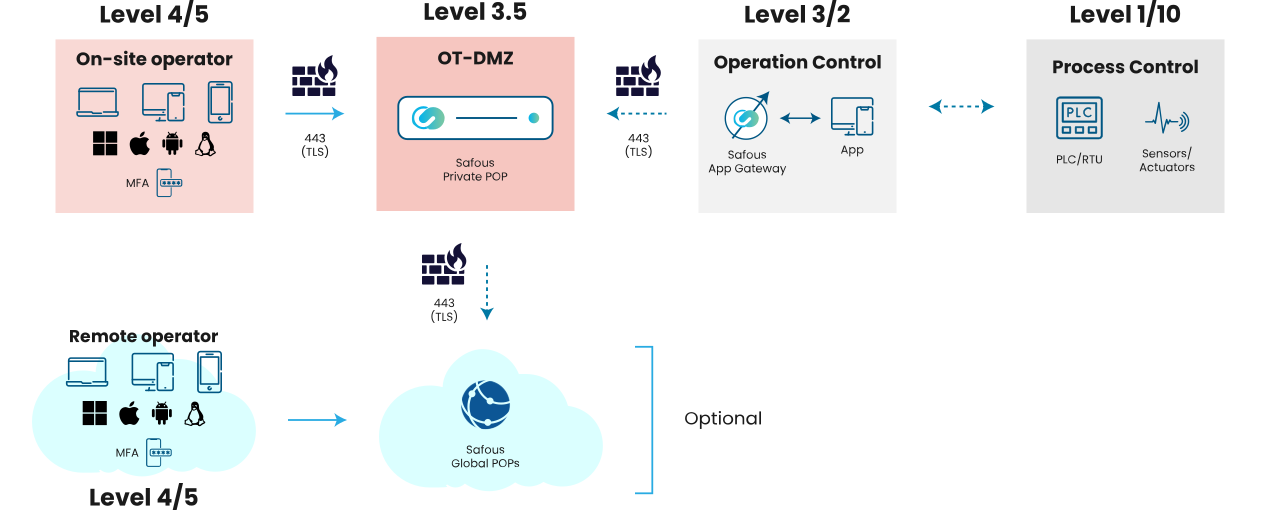
Engineers, OEMs and integrators reach one approved asset through the Safous AppGateway in your network, never the plant network itself.
See It in Action: OEM Remote Maintenance
A control-system fault stops the line at night. See three ways a plant can handle the OEM's remote repair: no access, a different entrance for every OEM, or one entrance the plant controls.
Architecture
What Safous provides
- Asset-level access, not network access: users reach only the PLC, HMI, engineering workstation or web app they are allowed to use.
- Agentless protocols: RDP, SSH, VNC, Telnet, web apps and SMB file shares from a browser, plus agent-based access for other TCP/UDP protocols.
- Supervised sessions: supervisor approval for sensitive assets, approvals of up to five stages, and live monitoring with the option to end a session.
- Session recording and command logs: browser playback, keyword search across commands, and SSH command control.
- No shared passwords: vaulted credentials are injected into the session, with just-in-time, time-limited access.
- Safe file transfer: file scanning, including ICAP integration, and clipboard and file controls.
Safous vs. Other Ways to Reach OT Remotely
Why industrial remote access needs more than a VPN or a remote desktop tool.
| VPN | Jump server | Remote desktop tools | Safous | |
|---|---|---|---|---|
| What users reach | The control network | A shared host on the network | The machine running the agent | One approved asset |
| OEM and vendor control | Shared VPN accounts | Shared accounts | Hard to govern centrally | Per-vendor, time-bound, with approvals |
| Session recording | No | Rarely | Varies | Yes, with live supervision and termination |
| Software on OT systems | VPN client on laptops | Remote desktop client | Agent on the target host | No agent for RDP, SSH, VNC or web |
| Air-gapped sites | Not supported | Possible, manual | Not supported | Isolated AppGateway supported |
| Evidence for ISA/IEC 62443 | Limited | Partial | Limited | Approvals, recordings and logs |
Built for isolated and air-gapped sites
The Safous AppGateway runs inside your environment on a server, a virtual machine or in the cloud. For sites that must stay offline, an isolated AppGateway supports air-gapped environments, and a private PoP keeps data in your region. This lets you place access controls between the enterprise network and the control network, in line with zone-and-conduit designs.
Supports OT security standards
Recorded, approved and least-privilege access maps to common requirements in ISA/IEC 62443, NIST CSF and national frameworks across APAC. See the ISA/IEC 62443 compliance checklist and the ASEAN cybersecurity checklist.
By industry
Manufacturing · Automotive · Energy and utilities · Critical infrastructure · Maritime · Mining · Pharma and life sciences · Food and beverage
OT Remote Access Requirements Checklist
Use this list to compare remote access solutions for operational technology (OT). Security teams and plant owners should agree on each point before a rollout.
- Named user identity: every user, internal or third party, signs in with their own account. No shared logins.
- Multi-factor authentication (MFA): through your existing identity provider or a built-in one.
- Least privilege per asset: access is granted to a specific PLC, HMI or workstation, not to a subnet.
- Approvals and maintenance windows: sensitive assets need a supervisor's approval, and access opens only for a set time.
- Session monitoring and recording: staff can watch live sessions, end them and replay them later.
- No inbound firewall ports: the plant does not expose any service to the internet.
- Protocol support: RDP, SSH, VNC, Telnet, web HMIs and file transfer, plus the TCP/UDP protocols your engineering tools use.
- Credential protection: passwords are injected into the session and never shown to the user.
- Offline and air-gapped sites: the solution still works where the site cannot connect to the cloud.
- Audit evidence: logs and recordings are easy to export for audits under standards such as ISA/IEC 62443.
How to Roll Out OT Remote Access
A phased rollout keeps production safe and builds trust with plant teams. A typical plan looks like this.
- List who connects today. Collect the VPN accounts, shared jump-server logins and remote desktop tools in use at each site. Note which vendors and teams use them.
- Map users to assets. For each group, list the exact assets they need. Group the assets by site and by level in the Purdue model.
- Set access policies. Decide which assets need approval, which need live supervision and how long access may last.
- Deploy the gateway. Install the Safous AppGateway in the site network. It makes outbound connections only, and Safous can be up and running in under 10 minutes.
- Start small. Begin with one site and one vendor, or run a proof of concept. Confirm that engineering tools work as expected.
- Expand and retire old paths. Add sites and vendors in waves. Close the VPN accounts and jump-server logins they replace.
- Review regularly. Check recordings and access logs each month. Remove users who no longer need access.
Done this way, OT remote access becomes a controlled and auditable process, not an open door into the control network. Talk to us about a proof of concept.
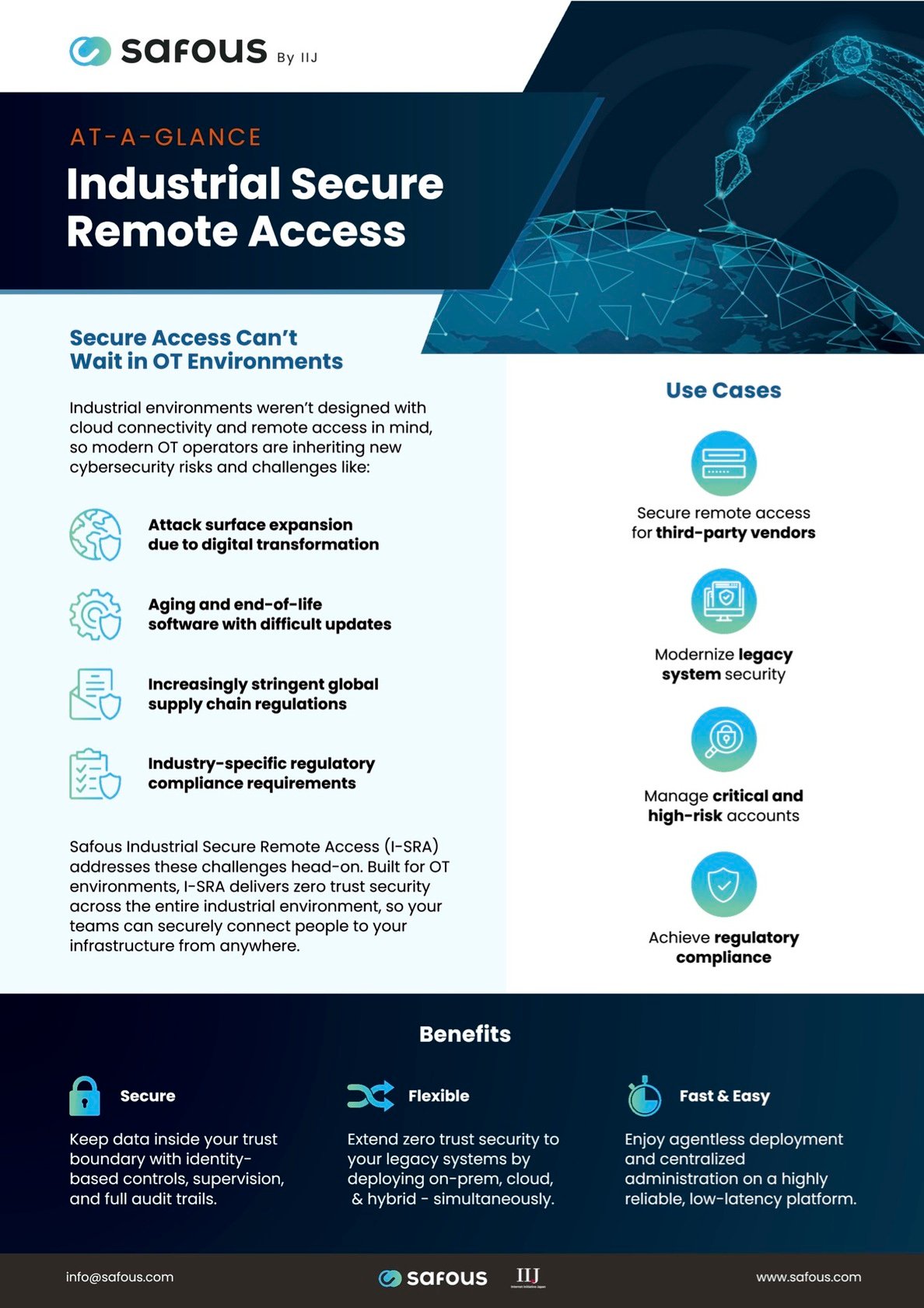
Industrial Secure Remote Access At-A-Glance
A two-page overview of how Safous secures remote access to OT and industrial systems, including isolated and air-gapped sites.
Customer Stories
How industrial organizations secure OT and vendor access with Safous.
Global automaker
Challenge: Across more than 10 production sites, IT remote access tools did not work with OT systems, and agents could not be installed on OT assets.
Result: Agentless, fully audited OT access replaced the VPN and aligned IT security with plant operations.
Global food manufacturer
Challenge: OEMs and contractors needed seven logins to reach one machine over VPN.
Result: One browser-based portal for employees, contractors and OEMs across 150 sites, rolled out in under 90 days.
Maritime operator
Challenge: Remote maintenance of lighthouses, offshore plants and port facilities relied on a vulnerable access tool.
Result: Secure, stable remote maintenance for 200 lighthouses, 250 offshore plants and 1,000 port facilities.
See Safous on Your Own OT Systems
Book a demo or run a proof of concept at one of your sites.
Frequently Asked Questions
What is OT secure remote access?
It is controlled remote access to operational technology such as PLCs, HMIs and SCADA. Each user reaches only approved assets, and every session is authenticated, supervised and recorded.
Does Safous need a VPN or a client on the engineer's laptop?
No. Users connect through a web portal with no client and no VPN. Agent-based access is available for other TCP/UDP protocols.
Can Safous work in air-gapped environments?
Yes. An isolated Safous AppGateway supports air-gapped sites, and a private PoP keeps data in your region.
How do we let OEMs support our machines safely?
Give each vendor access to its own equipment only, require supervisor approval, and record the session. Access ends when the job is done.
Which protocols are supported?
RDP, SSH, VNC, Telnet, web apps and SMB agentlessly, plus any TCP/UDP protocol with the agent.
Related: Third-party and vendor access · Privileged remote access guide · Safous Privileged Remote Access at a glance
More Resources

How to Implement Agentless Privileged Remote Access for IT and OT: Step by Step
Industrial Cybersecurity Solutions: Categories and How to Evaluate Them


.png)