









Agentless privileged remote access lets administrators, OT engineers and third-party vendors reach specific critical systems from a browser, without client software, shared passwords or a VPN connection into the network. This guide explains how to implement it step by step: inventory privileged access paths, design the gateway architecture, vault credentials, set least-privilege and approval policies, turn on session recording, and retire VPN accounts and jump servers. It is written for IT and OT teams in Japan and ASEAN, where plants and infrastructure are often maintained by external vendors.
What Is Agentless Privileged Remote Access?
Agentless privileged remote access is a model in which the browser is the only client: the user authenticates, a policy decides which critical system they may open, credentials are injected from a vault, and the session is brokered to that one system and recorded. It combines secure remote access with privileged access controls, a category often called remote privileged access management (RPAM); see Safous RPAM.
The difference from traditional PAM is where the software runs and how the user gets in. Traditional PAM typically assumes the user is already on the network (often through a VPN) and may require agents on endpoints or targets. Agentless privileged remote access delivers the connection itself, which matters when the device belongs to a vendor or the target is an HMI that cannot run additional software. For the definition and trade-offs of agentless access, see agentless remote access for IT, OT and IoT; this article focuses on implementation.
Step 1: Inventory Privileged Access Paths
Start by listing every way people reach critical systems today, because each path you find is one you will replace. Include employees, administrators, OT engineers, system integrators and maintenance vendors.
- Entry points: VPN accounts, jump servers and bastion hosts, remote desktop tools installed by vendors, modems or cellular routers left in panels.
- Targets: Windows servers and engineering workstations (RDP), Linux and network devices (SSH/Telnet), HMIs (VNC), web consoles, and file shares (SMB).
- Accounts: shared administrator and OT accounts, vendor accounts, and service accounts with passwords that have not changed in years.
- Owners: who approves access to each system today, if anyone.
The output is an access matrix: user group, target, protocol, account used, and current entry point. If jump servers are part of the picture, see jump server security risks.
Step 2: Design the Gateway Architecture
An agentless privileged remote access architecture has three parts: an access layer that authenticates users and applies policy, a gateway inside each site that connects outbound to that layer, and the critical systems the gateway is allowed to reach.
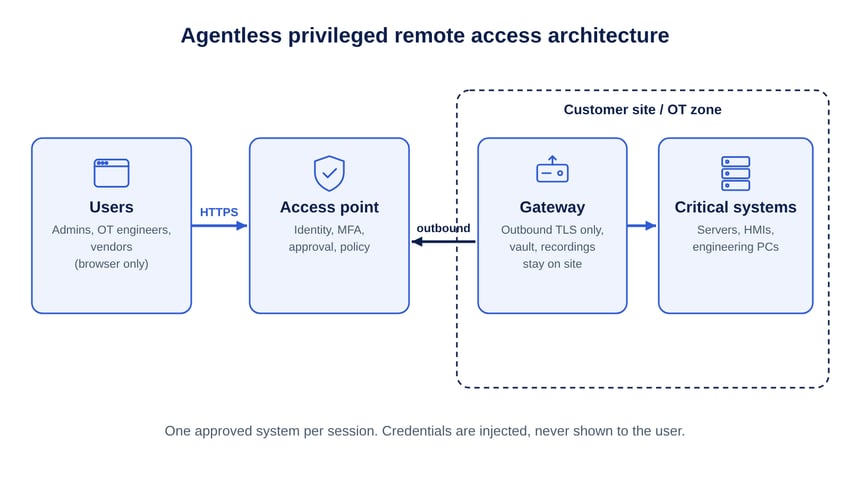
- Gateway placement: one gateway per site or zone, placed where it can reach only the systems it should publish. In OT, place it in the DMZ or the zone that already brokers IT-to-OT traffic, in line with the zones and conduits model of ISA/IEC 62443.
- Connection direction: use a gateway that connects outbound only, so no inbound firewall rules are opened toward the plant.
- Data residency: decide where credentials, logs and session recordings are stored. Many organizations in Japan and ASEAN require them to stay in their own environment; see privileged remote access requirements by ASEAN country.
- Isolated sites: for air-gapped plants, plan a private access point and an isolated gateway instead of a public path.
Step 3: Connect Identity and Vault Credentials
Give every user a named identity with MFA, then move the passwords for privileged and shared accounts into a vault so they are injected into sessions instead of being handed to people.
- Integrate the existing directory or IdP (Active Directory, LDAP, SAML or OIDC) for employees, and use a separate directory or federation for vendors.
- Replace shared vendor logins with one identity per engineer, so every action can be attributed to a person.
- Vault shared OT and administrator accounts and turn on credential injection; rotate passwords that vendors have known in the past.
- Publish each target as a named resource (for example "Line 3 HMI – VNC") rather than an IP range.
Step 4: Set Least-Privilege and Approval Policies
Policies should answer four questions for every privileged session: who the user is, which system they may open, under which conditions, and for how long.
The target state is zero standing privileges: nobody keeps permanent access to critical systems, and access exists only while an approved session is active.
Step 5: Turn On Session Monitoring and Recording
Privileged sessions should produce evidence by default, so that audits and incident reviews do not depend on what users remember.
- Record RDP, SSH, VNC and Telnet sessions and keep command-level logs that can be searched.
- Allow live supervision of high-risk vendor work, with the ability to terminate a session.
- Forward session and approval logs to your SIEM, and map the controls to the frameworks you report against; see remote access compliance.
Step 6: Pilot, Migrate and Retire VPN Accounts and Jump Servers
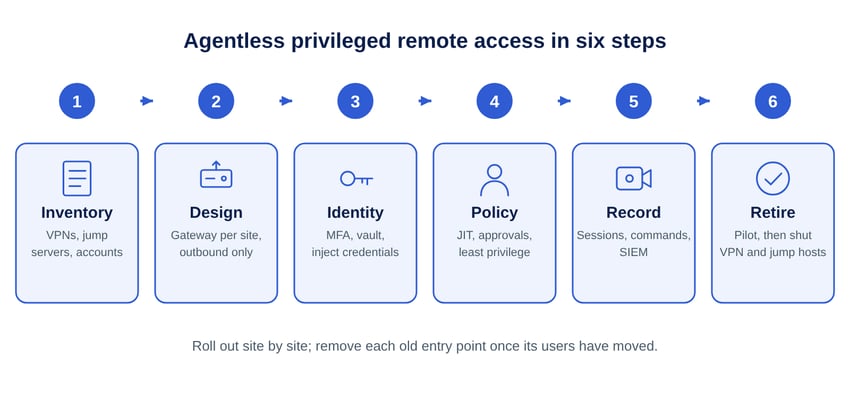
Roll out site by site: pilot with one user group, verify that access is limited to the published systems, then migrate the remaining groups and shut down the old entry points.
- Verify scope: from a pilot session, confirm that other hosts on the same subnet cannot be reached.
- Verify evidence: confirm that sessions are recorded and searchable and that approvals appear in the SIEM.
- Verify operations: have an OT engineer and a vendor complete a real maintenance task; note any protocol that needs the optional agent.
- Retire: disable VPN accounts and decommission jump servers per group, close inbound ports opened for remote access, and remove vendor-installed remote desktop tools.
How Safous Supports Agentless Privileged Remote Access
Safous Privileged Remote Access provides browser-based access to HTTP/HTTPS, RDP, SSH, Telnet, VNC and SMB targets with no client software, and an optional agent for other TCP/UDP applications. It covers administrators, OT engineers and third-party vendors on one platform across IT, OT and IoT.
- Architecture: Safous Global Access Points, with dense coverage in Asia, receive sessions; Safous AppGateway runs on a customer Linux host, VM or cloud instance and connects outbound over TLS, with no inbound ports. Credentials, logs and recordings stay in the customer environment. Private access points and an isolated AppGateway support air-gapped OT sites. Deployment takes under 10 minutes.
- Identity: built-in IdP or IdP proxy, MFA (TOTP, email, SMS, WhatsApp), SSO, and LDAP/AD, SAML, OIDC and RADIUS integration.
- Credentials: personal and shared vaults, credential injection and password rotation.
- Policy: RBAC and ABAC, just-in-time access, zero standing privileges, up to five levels of approval, device posture checks, and threat-intelligence blocking of VPN, proxy, Tor and hosting sources.
- Session control and evidence: live monitoring and termination, supervised and collaborative sessions, clipboard and file controls, SSH command control, session recording, command-level logging with search, and SIEM integration.
See the Safous Privileged Remote Access fact sheet, the privileged remote access guide and industrial secure remote access for OT deployments.
Frequently Asked Questions
What is agentless privileged remote access?
Agentless privileged remote access is a way to give administrators, OT engineers and third-party vendors access to specific critical systems from a web browser, without installing software on their devices, with credentials injected from a vault and every session authorized, monitored and recorded.
How is agentless privileged remote access different from a VPN and jump server?
A VPN places the user's device on a network segment and a jump server adds a shared hop inside it, so access is broad and credentials are often known to users. Agentless privileged remote access brokers a session to one approved system at a time, keeps credentials in a vault, and records what the user does in that session.
Is agentless privileged remote access the same as ZTNA?
No. ZTNA (zero trust network access) is a category for giving users per-application access to business applications as an alternative to a VPN. Agentless privileged remote access is focused on privileged sessions to critical IT and OT systems: it adds credential vaulting and injection, approval workflows and just-in-time access, live session monitoring, session recording and command-level audit logs, and it extends this to third-party vendors without client software. Some platforms provide per-application access as one capability, but the purpose and controls are different.
Does agentless privileged remote access work for OT systems such as HMIs and engineering workstations?
Agentless privileged remote access works for OT systems that are reached over RDP, VNC, SSH, Telnet or web interfaces, because nothing has to be installed on the HMI, engineering workstation or the user's laptop. Industrial software that needs other TCP/UDP protocols can be covered by an optional agent for the users who need it.
How long does an agentless privileged remote access rollout take?
The first gateway and a first protected system can be live on the day of deployment when the gateway only needs outbound connectivity. A full rollout usually runs over several weeks because inventory, vaulting, approval design and the retirement of VPN accounts and jump servers are done site by site.
Plan your privileged remote access rollout. Talk to the Safous team about your sites, vendors and critical systems: get started with Safous.
Subscribe with Safous
Receive the latest news, events, webcasts and special offers!