
















Just-in-time access (JIT access) is a privileged access model that grants a user access to a specific system only when a task requires it, for a limited time, and removes it automatically afterwards. For teams that manage IT servers, OT controllers and a long list of maintenance vendors, JIT access reduces the number of privileged accounts that are active at any moment. This guide explains how JIT privileged access works, how it compares with standing access, and how to apply it to IT, OT and third-party access.
What is just-in-time access?
Just-in-time access is the practice of granting privileged access per task and per time window instead of leaving it permanently assigned. A user requests access to a named system, the request is approved by policy or by a person, access is granted for the approved window, and it ends automatically.
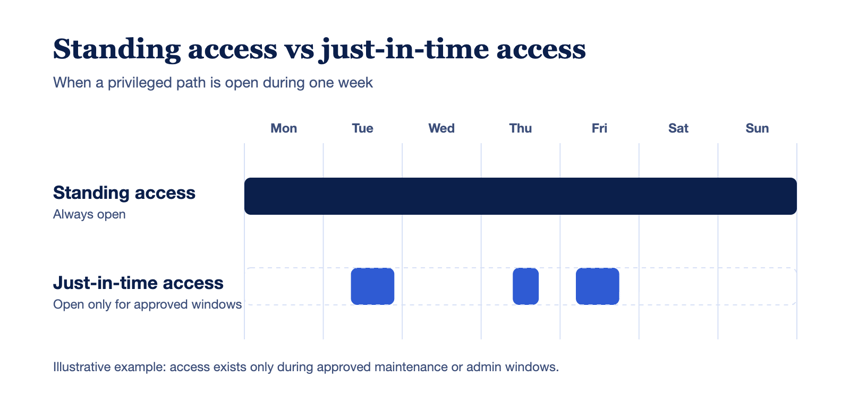
The opposite is standing access: administrator accounts, vendor VPN accounts and shared passwords that remain valid every hour of the year. Standing privileges are a common target because an attacker who obtains the credentials can use them at any time. JIT access is the main mechanism for reaching zero standing privileges, the state in which no account holds privileged access while it is not in use. For the related principle, see zero trust vs least privilege.
Just-in-time access vs standing access
The difference between just-in-time access and standing access is when privileges exist: standing access is always on, while JIT access exists only for an approved task and time window. The table compares the two models.
How does just-in-time privileged access work?
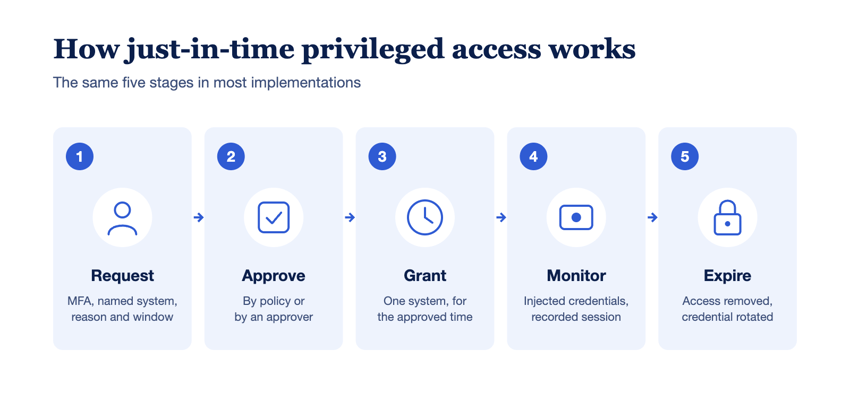
JIT privileged access follows the same five-stage flow in most implementations: request, approval, time-bound grant, monitored session and automatic expiry.
- Request. The user authenticates with MFA and requests access to a named system, with a reason or ticket number and a time window.
- Approval. Policy approves low-risk requests automatically; requests for sensitive systems go to one or more approvers.
- Time-bound grant. Access is opened only to the approved system, and only for the approved window.
- Monitored session. Credentials are injected from a vault, so the user never sees the password; the session is recorded and can be watched or ended live.
- Automatic expiry. When the window ends, access is removed and the credential can be rotated.
JIT access models: elevation, ephemeral accounts and brokered sessions
There are three common ways to deliver just-in-time access, and they differ in where the privilege is granted. Many organizations use more than one.
- Time-bound role elevation: a user is added to a privileged group or role for a set time, then removed. This suits cloud and directory-managed IT systems.
- Ephemeral accounts: a temporary account is created for the task and deleted afterwards. This suits systems that support automated account management.
- Brokered JIT sessions: the user never receives network access or the password; a broker opens a recorded session to the approved system for the approved window. This suits OT assets, legacy servers and vendors, where agents and account changes on the target are often not possible.
Just-in-time access for OT and third-party vendors
In OT and vendor access, JIT access is usually tied to a maintenance window or work order rather than to an IT ticket. An OEM engineer who services a packaging line once a quarter does not need an account that works the other 89 days.
This pattern is common across manufacturing, utilities and healthcare in ASEAN and Japan, where plants depend on equipment vendors that support sites in several countries. Brokered JIT access lets the asset owner approve each visit, limit it to the controllers in the work order, record what was done, and close access without relying on the vendor to disconnect. Frameworks used in the region, such as Singapore's Cybersecurity Code of Practice for Critical Information Infrastructure and ISA/IEC 62443, include access control requirements that apply to privileged and remote access; check the current text for the exact clauses that apply to you, and see regulatory compliance for country checklists. For vendor workflows, see how to secure contractor and third-party access.
How to implement just-in-time access
Implementing JIT access starts with finding standing privileges and ends with removing them. A practical order is:
- List privileged accounts, shared passwords and always-on vendor connections.
- Group systems by risk and decide which need human approval and which can be approved by policy.
- Move credentials into a vault and inject them into sessions.
- Set default time windows per role, for example a shift for operators and a work order window for vendors.
- Remove standing access once JIT access is in use, and review recordings and logs regularly.
How Safous delivers just-in-time privileged access
Safous delivers JIT access as brokered sessions: users reach one approved application or asset for the approved time, without network access and without seeing the credential. Safous Privileged Remote Access includes:
- JIT access with zero standing privileges, RBAC and ABAC policies and up to 5-level access approvals.
- MFA (TOTP, email, SMS, WhatsApp), SSO and a built-in IdP or integration with LDAP/AD, SAML, OIDC and RADIUS.
- Personal and shared vaults, credential injection and password rotation.
- Live monitoring and termination, supervised sessions, session recording for RDP, SSH, VNC and Telnet, and command-level logging with SIEM integration.
- Agentless browser access over HTTP/HTTPS, RDP, SSH, Telnet, VNC and SMB, with the Safous AppGateway connecting out over TLS so no inbound ports are opened.
The same controls apply to IT, OT and IoT systems. See the Safous Privileged Remote Access fact sheet and the privileged remote access guide.
Frequently asked questions
What is just-in-time access?
Just-in-time (JIT) access is a privileged access model in which a user receives access to a specific system only when a task requires it, for a limited time, usually after approval, and loses that access automatically when the time window ends. It replaces standing privileges that remain active whether or not they are used.
What is the difference between just-in-time access and zero standing privileges?
Zero standing privileges is the goal that no account keeps privileged access when it is not in use. Just-in-time access is the mechanism that achieves it: privileges are granted for a task and time window and then removed, so nothing remains to be stolen or misused between tasks.
Does just-in-time access work for OT systems?
Yes. In OT environments just-in-time access is usually tied to maintenance windows and work orders: an engineer or vendor requests access to a named controller or HMI, an operator approves it, the session is recorded, and access ends when the window closes. Brokered access avoids installing agents on PLCs, HMIs or legacy servers.
How do you implement just-in-time access for third-party vendors?
Give each vendor engineer a named account with MFA, require a request that names the asset and time window, route it to an approver on the asset owner side, inject credentials from a vault instead of sharing passwords, record the session, and let access expire automatically when the window ends.
Remove standing privileges from your IT, OT and vendor access. Get started with Safous.
Subscribe with Safous
Receive the latest news, events, webcasts and special offers!