

















To secure contractor and third-party access without full network access, give each contractor access to the specific applications their work requires, for a limited time, under approval and recording, instead of a VPN account that places them on the internal network. This guide shows how to do that in practice for IT and OT environments, including the maintenance vendors and system integrators that manufacturers in Japan and ASEAN rely on.
What Is Application-Scoped Third-Party Access?
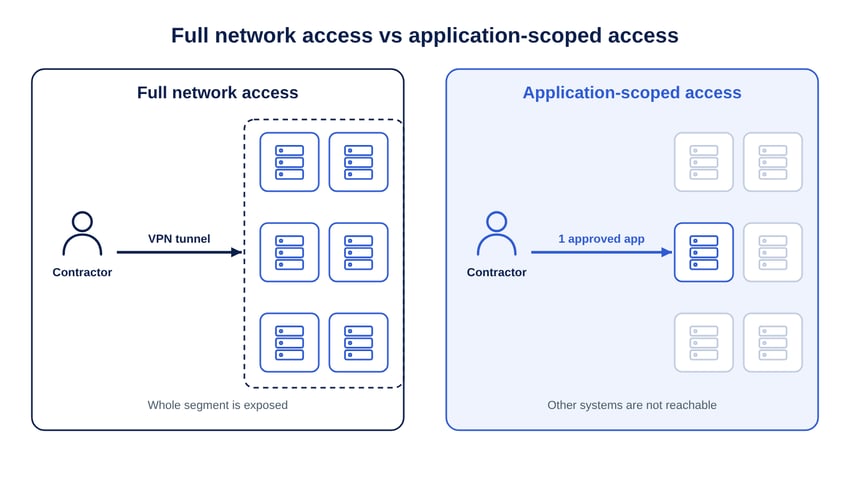
Application-scoped third-party access is a remote access model in which a contractor can open only named systems, such as one server, one HMI or one web console, and cannot reach anything else on the network. The contractor connects to a broker; the broker connects to the target. The contractor's device never joins an internal subnet.
This is the zero trust principle applied to non-employees: access is granted per resource and per session, based on identity and context. It differs from network-level access, where a VPN or firewall rule exposes an entire segment once the contractor is connected.
Why Full Network Access Is a Problem for Contractors
Full network access is a problem because the organization cannot control the contractor's device, cannot see who is behind a shared vendor account, and often forgets to remove access after the job ends.
- Unmanaged devices: vendor laptops are outside your endpoint controls; with a VPN they sit inside your network.
- Lateral movement: once on a subnet, a compromised session can scan and reach other hosts, including OT systems.
- Shared credentials: vendors often use one account for several engineers, so actions cannot be attributed to a person.
- Standing access: accounts created for one project remain active for months. See the vendor offboarding checklist for removal steps.
How to Secure Contractor Access Step by Step
The steps below replace network-level vendor access with application-scoped access. Each step can be done for one vendor at a time, starting with the vendor that touches the most sensitive systems.
1. Inventory vendors and the systems they touch
List every contractor, integrator and maintenance vendor, the systems they access, the protocols they use (web, RDP, SSH, VNC, file transfer), and who owns each relationship internally. This becomes the scope for publishing.
2. Give every contractor a named identity with MFA
Replace shared vendor accounts with one identity per person. Use the vendor's own IdP through federation where possible, or a separate directory for external users, and require MFA for every login.
3. Publish only the systems in the contract
Publish each target as a named resource and assign it to the vendor group. A vendor that maintains one packaging line's HMI should see that HMI and nothing else. Network segmentation remains useful as a second layer; see network segmentation for hybrid IT/OT.
4. Require approval and time-bound access
Make sessions to production systems require approval from the system owner and expire after the maintenance window. Just-in-time access removes standing privileges, so there is no idle vendor account to misuse.
5. Keep credentials out of contractors' hands
Store target passwords in a vault and inject them into the session. Rotate shared passwords after the work. The contractor completes the task without ever learning the credential.
6. Control, monitor and record sessions
Restrict clipboard and file transfer by default, allow live supervision for high-risk work, record sessions and keep command-level logs. Send the logs to your SIEM so third-party activity is part of normal monitoring.
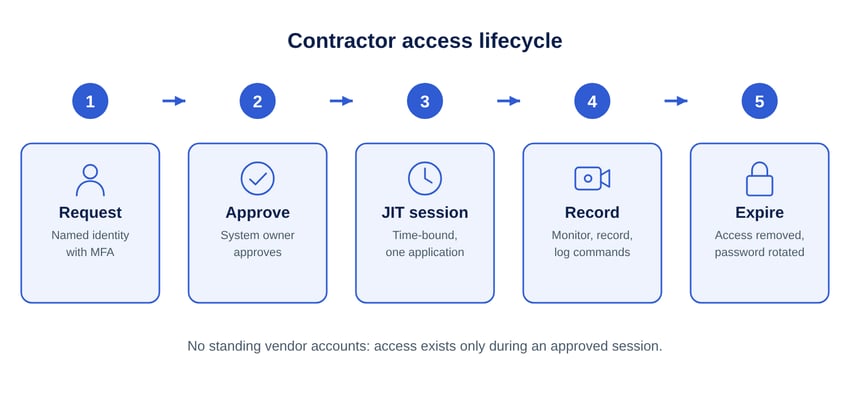
Document these rules in a vendor access policy so that procurement and system owners apply them consistently; a template is available in how to write a vendor remote access policy.
Third-Party Access in OT and Regulated Environments
In OT environments, third-party access is often unavoidable because equipment makers and integrators maintain PLCs, HMIs and engineering workstations under service contracts. Application-scoped access lets them do this without a permanent connection into the control network.
Frameworks that address remote and third-party access include ISA/IEC 62443 for industrial systems, NIST SP 800-82 for OT security, and country regulations across ASEAN. For a mapping of controls to frameworks, see Safous regulatory compliance and remote access compliance.
How Safous Secures Contractor and Third-Party Access
Safous Privileged Remote Access gives contractors browser-based access to approved applications only, without VPN accounts, client software or inbound firewall ports.
- No network exposure: contractors connect through Safous Global Access Points to Safous AppGateway, which runs in your environment and connects outbound over TLS. Contractors reach published applications only.
- Agentless access: HTTP/HTTPS, RDP, SSH, Telnet, VNC and SMB from a browser; an optional agent covers other TCP/UDP applications when needed.
- External identities: built-in IdP or IdP proxy, MFA by TOTP, email, SMS or WhatsApp, and SAML, OIDC, LDAP/AD and RADIUS integration.
- Least privilege: RBAC and ABAC, just-in-time access, zero standing privileges, up to five levels of approval, and device posture checks.
- Credentials and evidence: vaults with credential injection and password rotation, clipboard and file controls, supervised and collaborative sessions, live termination, session recording, command-level logging with search, and SIEM integration.
Learn more on the Safous third-party access page, the Safous Privileged Remote Access fact sheet and the privileged remote access guide.
Frequently Asked Questions
How do I secure contractor and third-party access without full network access?
Give each contractor access to named applications instead of a network: authenticate them with MFA, publish only the systems their contract covers through a broker or gateway, require approval and a time window for each session, inject credentials instead of sharing them, and record the session. VPN accounts that place the contractor on an internal subnet are removed.
Why is VPN access risky for contractors?
VPN access is risky for contractors because it places their device on an internal network segment, so every reachable host is exposed to that device and its user, and access often stays active after the work is done. A compromised vendor laptop or reused vendor password then becomes a path into the network.
How do I choose a remote access tool that limits non-employee access to specific systems?
Choose a tool that publishes individual applications rather than subnets, works from a browser so vendors do not install software, supports external identities with MFA, offers approval workflows and just-in-time windows, injects credentials from a vault, and records sessions with searchable logs that can be sent to a SIEM.
Should contractors use shared accounts on OT systems?
Contractors should not see or hold passwords for shared OT accounts. Where a shared account cannot be avoided on legacy equipment, store its password in a vault, inject it into an approved session, record the session to attribute actions to the named contractor, and rotate the password after the work.
Remove VPN accounts from your vendor access. Talk to the Safous team about scoping contractor access to the systems they need: get started with Safous.
Subscribe with Safous
Receive the latest news, events, webcasts and special offers!