


















A jump server is a hardened host that administrators and vendors log in to before they reach internal servers, controllers or network devices. For many teams in Singapore, Malaysia, Thailand and Japan it is still the main path into production and OT networks. This guide explains when a jump server is still enough, when it is time to replace your jump host with privileged remote access, and how to migrate without disrupting operations.
What is the difference between a jump server and privileged remote access?
A jump server gives a user a network foothold from which they reach other systems; privileged remote access gives a user one brokered session to one approved system, without placing them on the network. That single difference drives most of the security and audit gaps described below.
With a jump server, the user typically connects over VPN, logs in to the intermediate host and then opens RDP or SSH to the target. Controls live on the host itself, so the evidence of what happened depends on how that host was configured. Privileged remote access (PRA) moves the control point to an identity-aware broker: the user authenticates with MFA, the request is approved, credentials are injected from a vault, and the session is recorded. Our earlier article What Is a Jump Server covers how the jump host model works; this guide focuses on the replacement decision.
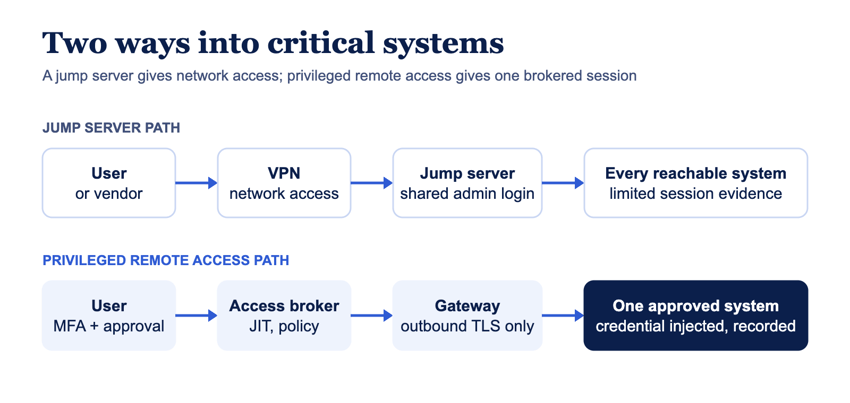
Jump server vs privileged remote access: side-by-side comparison
The table compares a typical VPN-plus-jump-server setup with an agentless privileged remote access model across the criteria auditors and OT owners ask about most.
When should you replace your jump server?
Replace the jump server when it can no longer prove who accessed which system, with what privilege and for how long. In practice, the following signs indicate that point has been reached:
- Shared admin accounts: several people or vendors use the same login on the jump host or the targets.
- Vendor VPN accounts without expiry: contractors keep network-level access after the maintenance window or contract ends. See how to secure contractor access without full network access.
- No session recordings: an incident review or audit asks what a user did, and only connection logs exist.
- One jump host per site: each plant or data center adds another server to patch, harden and monitor.
- Audit findings on MFA or least privilege: regulators and customers expect MFA and scoped access for privileged and remote sessions.
- The jump host is the lateral-movement path: a compromised account on the host reaches every system behind it.
When a jump server can still be enough
A jump server can remain adequate when a small internal team administers a few systems, every user has a named account with MFA, access is restricted per target, and host logs are forwarded to a SIEM. Even then, plan for recordings and vendor access, because those are the controls a jump host rarely provides on its own.
How to migrate from a jump server to privileged remote access
Migrate in phases: inventory the access paths, deploy the gateway beside the existing jump host, move user groups one at a time, and retire the jump host only after the new path is proven.
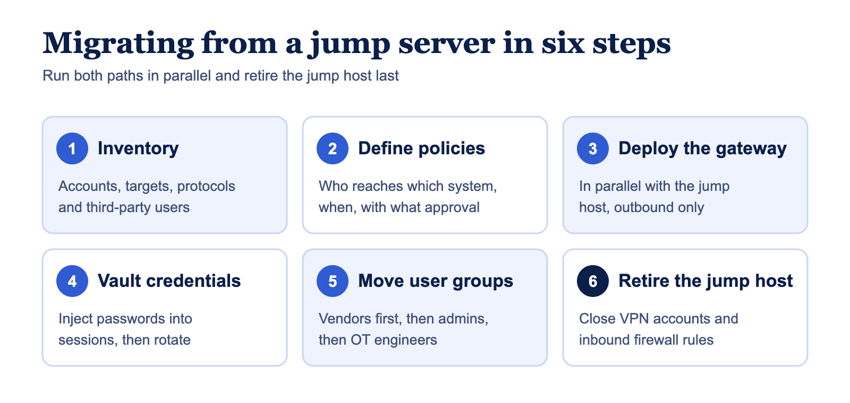
- Inventory access paths. List every account on the jump host, the systems each one reaches, the protocols used and which users are third parties.
- Define policies. Map users and vendors to the specific systems and hours they need, and decide which sessions require approval and recording.
- Deploy the gateway in parallel. Install the gateway on a Linux host, VM or cloud instance inside each network segment; it needs outbound connectivity only.
- Vault the credentials. Move shared admin passwords into the vault, enable credential injection and rotate the passwords once users no longer need to know them.
- Move user groups. Start with third-party vendors, then internal administrators, then OT engineers, confirming recordings and logs at each step.
- Retire the jump host. Disable VPN and jump-host accounts, close the inbound rules and keep the old logs according to your retention policy.
For a protocol-by-protocol rollout plan, see How to Implement Agentless Privileged Remote Access for IT and OT.
Jump server replacement in ASEAN and Japan
Regulators and critical-infrastructure frameworks across ASEAN expect MFA, least privilege, logging and control of third-party access for privileged and remote sessions, so replacing a jump host is often driven by audit evidence rather than technology alone. Manufacturing and utility sites in the region also rely heavily on equipment vendors who connect for maintenance, which makes vendor-scoped access a priority. Our guide to privileged remote access requirements by country in ASEAN and the regulatory compliance overview map these expectations to controls.
How Safous replaces the jump server
Safous Privileged Remote Access replaces the jump host with agentless, browser-based sessions for HTTP/HTTPS, RDP, SSH, Telnet, VNC and SMB, with an optional agent for other TCP and UDP protocols. Users connect through Safous Global Access Points, and the Safous AppGateway in your environment connects outbound over TLS, so no inbound ports are opened and credentials, logs and recordings stay in your environment. Policies combine MFA, RBAC and ABAC, just-in-time access, up to five levels of approval and device posture checks. Sessions can be monitored live, terminated, recorded and searched at the command level, and events can be sent to your SIEM. For air-gapped OT, a private PoP and isolated AppGateway are available. Details are on the Safous Privileged Remote Access product page and the at-a-glance fact sheet.
Frequently asked questions
Is a jump server the same as a bastion host?
In most organizations the terms are used interchangeably. Both describe a hardened intermediate host that administrators connect to before reaching internal systems. Some teams reserve "bastion host" for an internet-facing host and "jump server" for an internal hop, but the security model and its limits are the same.
Can privileged remote access replace a jump server completely?
Yes, for interactive administrative access over protocols such as RDP, SSH, VNC, Telnet and web consoles. Privileged remote access brokers each session to one approved system, injects credentials and records the session, which covers the purpose of a jump server. Teams sometimes keep a hardened host for specific tooling or batch jobs that are not interactive sessions.
How long does a jump server migration take?
The gateway and first applications can be running on the same day; Safous Privileged Remote Access deploys in under 10 minutes per gateway. The overall timeline depends on how many systems, user groups and sites are moved. A phased plan that runs both paths in parallel for a few weeks per site is common.
Do vendors need to install software to use privileged remote access instead of a jump server?
Not for browser-based access. With agentless privileged remote access, vendors open approved RDP, SSH, VNC, Telnet, SMB or web sessions from a browser after authenticating with MFA. An optional agent is used only when a workflow needs other TCP or UDP protocols.
Replace your jump host with brokered, recorded access
If your jump servers still rely on VPN accounts and shared passwords, start with one site or one vendor group. Get started with Safous to see privileged remote access running beside your existing jump host.
Subscribe with Safous
Receive the latest news, events, webcasts and special offers!